
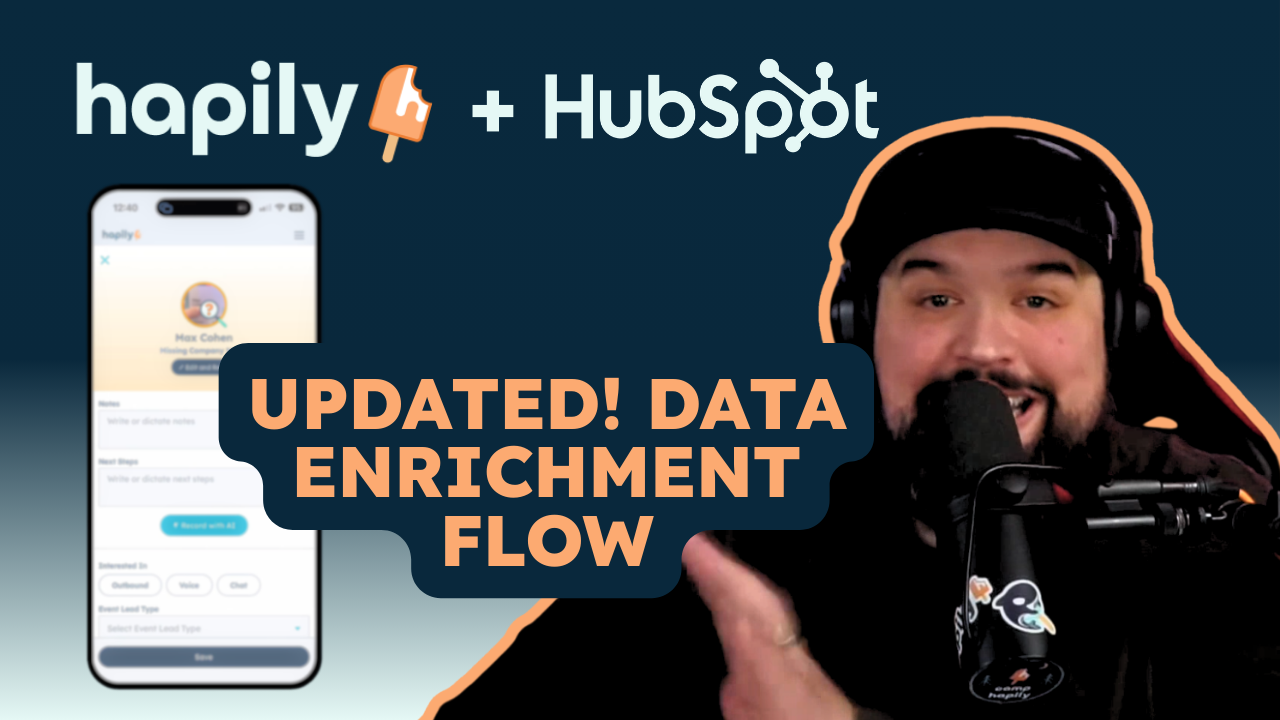
Last week, we announced some exciting new updates to Mobile Lead Capture aimed at making it easier to capture and act on leads in the moment.
There’s a lot in there, so we’re breaking out a few of the updates and digging into them a bit more to help get the most out of them. This one is all about data quality — what’s changed in enrichment, how coverage has improved, and how your CRM now plays a role in the process.
Because capturing a lead is easy. Capturing something your team can actually use later? That’s where things usually get a little shaky, and why we aimed to fix it.
So, What's New Here?
We didn’t just tweak enrichment, we gave it a lot more ways to succeed.
- Additional verified data providers working behind the scenes
- Expanded social search to help find harder-to-match contacts
- Phone numbers can now included in enrichment (for 1 additional credit!)
- Overall data coverage match increased from ~80% to 95.5%
- CRM matching now searches your HubSpot instance for existing contacts
Put simply, we’re a lot better at finding the person you just talked to. And if we already know them, we’ll show you that too.
Why Improving Coverage Matters
Coverage sounds like a backend metric, but you feel it immediately when you’re working an event.
When enrichment doesn’t hit, it’s obvious. You’re left with a half-filled record, or you move on knowing it’s something you’ll have to deal with later. Neither is ideal when you’re in the middle of conversations and trying to keep things moving.
Improving enrichment rates from ~80% to 95.5% coverage just means that happens way less often.
- More scans turn into real contacts
- Fewer “we’ll fix this later” moments
- Less second-guessing what you actually captured
More Ways to Find the Person you Just Talked To
Event data isn’t perfect. Badges are inconsistent, scans aren’t always clean, and sometimes you’re working with incomplete info.
Capturing a lead now starts with a simple choice — scan a badge or enter details manually. From there, enrichment can run off a full name and company, or just an email, and pull back things like job title, phone number, and other contact details automatically.
But now, if a scan comes in missing something critical — like a company name — we catch it immediately and prompt you to fix it before enrichment runs. Instead of finding out later that a lookup failed, you can correct it on the spot and retry right away.
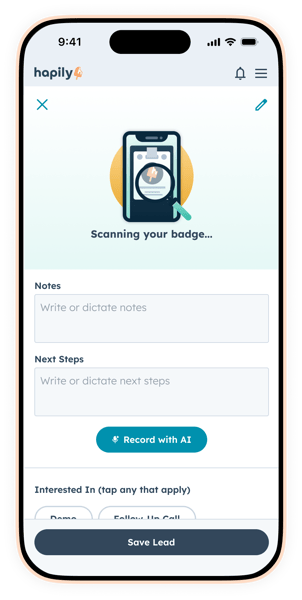
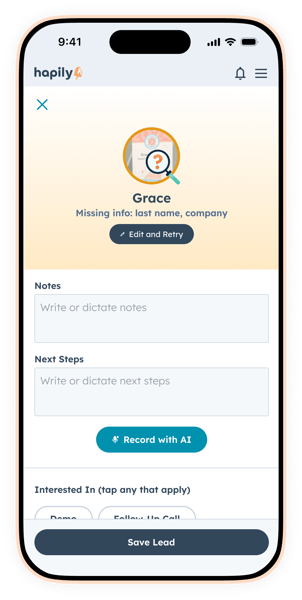
From there, we’ve expanded how enrichment works to give it more ways to still find and enrich the contact — even when the input isn’t perfect.
Now you’ve got:
- Multiple data providers increasing the chance of a match
- Social-based lookup when standard data isn’t enough
- Fallback logic that keeps trying if the first pass doesn’t hit
The result is a much higher likelihood that every scan turns into something real and usable.
Bringing Your CRM Data into the Lead Capture Fold
This is a really intentional update in how lead capture works.
A lot of the people you meet at events aren’t net-new. They’re already in your CRM — from past campaigns, target account lists, or attendee lists you uploaded ahead of time.
Before this, you’d scan them and end up creating a brand new contact … and then someone (usually you) had to sort that out later. Now, we search your CRM alongside enrichment and surface matches in real time.
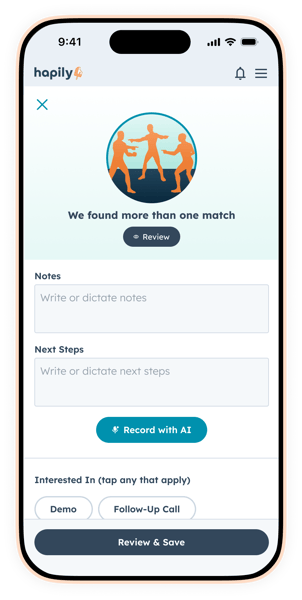
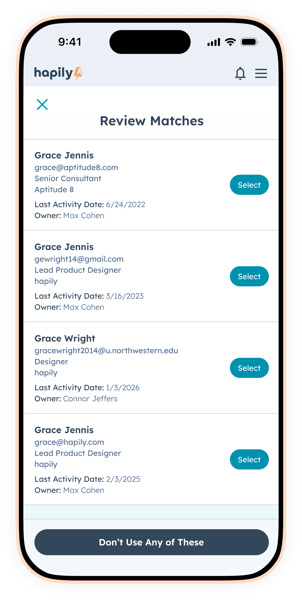
So instead of guessing, you can:
- Recognize existing contacts immediately
- Select the right record if duplicates exist
- Jump straight into their CRM profile for context
You’re not just capturing data — you’re connecting it to the right place from the start.
Where This Pays Off
This combination of higher coverage and CRM matching shows up most in the situations where lead capture usually breaks down — or creates extra work later.
1. When you upload attendee lists ahead of time
If you’ve already got a list of registrants in your CRM, you shouldn’t be re-creating those contacts onsite.
Now, instead of capturing someone and reconciling it later, you can match them directly to the right record in real time. That means:
- No duplicate contacts created
- No manual cleanup after the event
- Immediate access to existing context (past interactions, account ownership, deal activity)
You’re not collecting net-new data — you’re connecting conversations to what you already know.
2. When you’re working target accounts
At a lot of events, the goal isn’t volume — it’s talking to the right people.
With CRM matching in the loop, you can recognize those contacts as soon as you capture them and tie that interaction back to the account immediately.
That makes follow-up a lot more precise:
- Sales knows exactly who engaged and when
- Conversations can pick up where they left off
- Activity ties directly into active pipeline
3. When enrichment data is inconsistent
Some industries just don’t have great coverage from external data providers. Smaller companies, niche roles, or less-visible markets can be harder to enrich reliably.
That’s where bringing your CRM into the process makes a real difference.
Even if external enrichment comes up short, your CRM can still provide:
- A confirmed identity
- Existing contact data
- Account-level context
So you’re not relying on a single source to get the full picture.
4. When the data you capture isn’t perfect
This happens constantly. Someone gives a personal email. A badge scan misses a field. A company name isn’t quite right.
Instead of those becoming dead ends, you now have multiple ways to still identify the right person — whether that’s through expanded enrichment or matching against existing CRM data.
The outcome is simple: fewer interactions get lost because the data wasn’t perfect.
Better data in. Better follow-up out.
At most events, the hard part isn’t getting people to stop by. It’s making sure those conversations turn into something your team can act on once the event is over.
Now, more of the people you talk to are captured as complete, enriched contacts. More of those contacts are matched to the right records in your CRM. And instead of spending time sorting out duplicates or filling in gaps, your team is working from data that’s already structured, connected, and ready to go.
And that carries through everything that happens next. Follow-up is faster because the context is already there. Sales isn’t guessing who someone is or where they fit. Marketing can actually see what engagement turned into. And the gap between “we had great conversations” and “we can tie this back to pipeline” gets a lot smaller.
If you want to see how this all comes together on-site, Ben and Max will be walking through the full experience live on Thursday 4/2/26 @ 1:30PM ET. ET.
Heading into your next event and need to get this in your team’s hands? Request a demo to see how hapily helps your team capture better data, move faster on-site, and turn conversations into pipeline without the cleanup afterward.

.png)