
4 Event Workflows Your Pipeline Will Thank You For
Turn LinkedIn conversations into registrations, meetings, meaningful connections, and pipeline with hapily + FirstTouch.


Events create pipeline long before the doors open and long after they close.
Events have a pretty incredible ability to bring people together. Whether you're hosting a customer event, sponsoring an industry conference, or sending your sales team to a trade show, every event creates opportunities to build relationships, start conversations, and drive pipeline.
But those opportunities aren't limited to the hours everyone spends together onsite.
Get the right people interested, create opportunities to meet face-to-face, and show up with more than a list of names to find.
Make the most of the hours everyone spends together, from booth conversations to meetings and side events.
Turn all those conversations, connections, and interactions into something bigger: pipeline.
The trick is connecting the dots.
Your CRM already holds valuable information about who your prospects are, which events they've attended, and how they've engaged with your team. And LinkedIn gives you another way to put that context to work, connecting with people where they're already building professional relationships.
When you bring the two together, you can go beyond one-off event promotions and generic follow-up.
 Attended last year's conference
- Lead scan at your booth
- Meeting with your rep

That's where hapily + FirstTouch come in.
Connects event planning, registration, meetings, onsite engagement, lead capture, and event data to HubSpot.
Brings LinkedIn outreach into HubSpot workflows, helping teams turn CRM signals into connection requests, messages, and ongoing conversations.
 HubSpot
Brings everything together so marketing and sales can coordinate their efforts, track engagement, and connect activity to pipeline.
A more connected event strategy that creates opportunities before, during, and after every event.
In this guide, we're breaking down four workflows you can use to make it happen.
Reconnect With Past Event Contacts
Turn last year's event connections into this year's opportunities.

You spend a ton of time and energy meeting people at events. But what happens to those relationships when the event ends?
Maybe someone attended your webinar six months ago. Maybe they stopped by your booth at last year's conference. Or maybe they registered for an event but never made it through the door.
Those are all valuable starting points for your next event outreach.
Instead of building your audience from scratch, use existing event engagement data to identify people who already know your team and give them a reason to reconnect.
Here's how to build it
- hapilyHubSpot
Start with a previous event's engagement data in HubSpot. Build a segment of contacts based on relevant activity, such as:
- Attended a previous event
- Registered but didn't attend
- Was captured as a lead at a past conference
- Engaged with a particular event or session
Narrow your audience further using lifecycle stage, company, industry, location, or account ownership.
- HubSpot
Build a contact-based workflow using membership in your selected segment as the enrollment criteria.
Add exclusions for contacts who have already registered for your upcoming event, opted out of outreach, or are already in another relevant campaign.
- FirstTouch
Use FirstTouch actions inside the HubSpot workflow to:
- Check whether the contact is already connected with the assigned sender on LinkedIn.
- Send a personalized message to existing connections, or queue a connection request for contacts who aren't connected.
- Follow up with an invitation that references the previous event or interaction.
- Stop or adjust the outreach when someone replies or registers.
- hapily
Direct interested contacts to your hapily-powered registration page.
Once they register, hapily creates the registration record in HubSpot, giving your team visibility into who responded to your outreach and signed up.
What the workflow could look like
- Enroll Contact into FirstTouch flow
- View profile
- Send connection request
- Check connection status
- Send message
FirstTouch actions drop right into your HubSpot workflows, alongside the event data hapily writes to the CRM.
Example LinkedIn outreach

Personalization tip: A reference to a previous event can make your invitation feel more relevant, but only mention a specific conversation or interaction if it actually happened.
What to measure
- LinkedIn connection acceptance and reply ratesFirstTouch
- Registrations from the target audiencehapily
- Re-engaged contacts from previous eventshapily
- Meetings or opportunities created from outreachHubSpot

You're using the relationships you've already started building to create more engagement at your next event, without treating every invitation like a cold introduction.
Fill Your Calendar Before You Hit the Event Floor
Turn targeted LinkedIn outreach into real meetings.
Showing up at a major conference and hoping to bump into the right people is one strategy. Showing up with meetings already on the calendar? Much better.
Events bring your prospects, customers, and target accounts into the same place, often for a very limited window of time. And while booth traffic is great, some of your most valuable conversations might happen over coffee, at a side event, or between sessions.
LinkedIn gives your team a way to start those conversations ahead of time, while CRM data helps make sure you're reaching out to the people who matter most.
Here's how to build it
- HubSpothapily
Use HubSpot to identify the contacts and accounts your team wants to meet. Consider:
- Open opportunities with contacts who may attend
- Target accounts in the event's industry or geographic area
- Existing customers worth connecting with
- Prospects who have engaged with your team previously
- Known event attendees from an imported attendee list
If the organizer provides an attendee list, you can bring that information into HubSpot and associate contacts with the event using hapily's event data structure.
- HubSpot
Set up a HubSpot contact-based workflow or segment for your target audience.
Assign each contact to the appropriate sales rep or account owner and make sure you have a clear way to track whether a meeting has been booked.
- FirstTouch
Use LinkedIn to reach out with a specific, low-pressure reason to meet. Your outreach could mention:
- That your team will be at the same conference
- A topic or challenge relevant to the prospect
- An invitation for coffee or a quick conversation
- A booth, meeting space, or side event where you'll be available
Use FirstTouch's LinkedIn connection and messaging actions to coordinate the outreach from the appropriate team member.
- hapilyHubSpot
When someone expresses interest, share your meeting link and get time on the calendar.
Use hapily's onsite meeting capabilities to help organize the event-related meeting activity and maintain the connection to your CRM.
Add a workflow exclusion or exit condition for booked meetings so your team doesn't keep asking someone to meet after they've already said yes.
What the workflow could look like
- Enroll Contact into FirstTouch flow
- View profile
- Send connection request
- Check connection status
- Send message
FirstTouch actions drop right into your HubSpot workflows, alongside the event data hapily writes to the CRM.
Example LinkedIn outreach
What to measure
- Target accounts contactedFirstTouch
- LinkedIn reply ratesFirstTouch
- Meetings booked before the eventhapily
- Meetings completed onsitehapily
- Opportunities created or progressed following meetingsHubSpot
You're making the most of limited face-to-face time by turning event attendance into planned, high-value conversations instead of relying entirely on whoever happens to walk by.
Turn Booth Conversations Into Side-Event Attendance
Keep the connections going beyond the expo floor.
Someone stops by your booth and has a great conversation with your team. Great! But why wait until next week to follow up?
If you're hosting a happy hour, customer dinner, private meetup, or other side event, that booth conversation might be the perfect opportunity to keep the relationship moving while you're still in the same city.
And when your team captures the interaction in HubSpot, it becomes a signal you can actually act on.
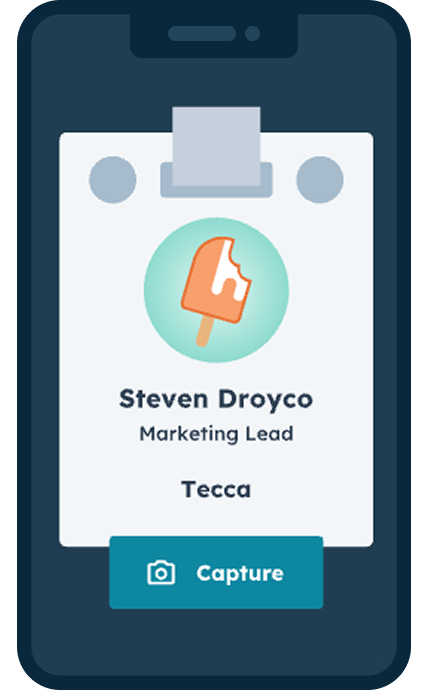
Capture the context with hapily lead capture
Every booth conversation is a signal, as long as your team captures it. With hapily's mobile lead capture app, reps scan a badge or business card and add the details that make outreach personal, all synced straight to HubSpot and associated with the event.
- Scan badges or business cardsNo more fishbowls or photos of cards.
- Add notes and topics discussedSo the rep knows exactly what to follow up on.
- Qualify on the spotCustomer or prospect, level of interest, and next step.
- Synced to HubSpot instantlyReady to trigger your side-event invites and follow-up.
Here's how to build it
- hapily
Use hapily's mobile lead capture app to scan a badge or business card and connect the contact to the event in HubSpot. Capture relevant context from the conversation, such as:
- What the person was interested in
- Whether they're an existing customer or prospect
- Topics discussed with your team
- Whether they'd be a good fit for your side event
- HubSpot
Build a HubSpot segment or workflow based on event lead activity and any qualifying information captured onsite. For example:
- Contact was captured at your booth
- Contact is a prospect or target account
- Contact has been marked as a good fit for the side event
- Contact has not already registered for the side event
For an invite-only experience, make the eligibility decision part of the process rather than automatically inviting every scanned contact.
- FirstTouch
Use the qualifying HubSpot contact data to enroll contacts into a LinkedIn outreach workflow.
If you're already connected, a short message from the person they spoke with is a great way to continue the conversation.
If not, start with a connection request that references the actual interaction, then follow up once they've accepted.
- hapily
Include a link to the side event's hapily registration page.
As people register, their event activity is recorded in HubSpot, helping your team keep track of who is attending both experiences.
You can also use registration data to prevent repeat invitations and coordinate follow-up.
What the workflow could look like
- Enroll Contact into FirstTouch flow
- View profile
- Send connection request
- Check connection status
- Send message
FirstTouch actions drop right into your HubSpot workflows, alongside the event data hapily writes to the CRM.
Example LinkedIn outreach
What to measure
- Qualified booth leads capturedhapily
- Side-event invitations sentFirstTouch
- Side-event registration ratehapily
- Side-event attendancehapily
- Meetings or opportunities influenced by additional engagementHubSpot
One booth conversation becomes an opportunity for another meaningful interaction, helping your team build stronger relationships while everyone is still together.
Follow Up While the Conversation Is Still Fresh
Turn onsite engagement into your next sales conversation.
We've all been there. You get home from a conference with a pile of leads and a vague recollection of who wanted what.
By the time the follow-up starts, half the context is missing.
But imagine if your sales team already knew who they spoke with, what they discussed, and what the next step should be. Even better, imagine if that information could help kick off relevant outreach instead of another generic "Great meeting you at the event!" message.
That's the power of connecting your event engagement data with your CRM and LinkedIn outreach.
Here's how to build it
- hapily
As your team meets people onsite, capture the interaction in HubSpot using the tools appropriate to your event:
- Lead scans for trade show and booth conversations
- Meeting records and notes from onsite conversations
- Registration and check-in activity for hosted events
- Relevant lead notes or engagement details
The more useful context your team captures, the more relevant your follow-up can be.
- HubSpot
Use HubSpot to identify contacts who need follow-up, separating audiences by engagement type or next step. For example:
High-intent prospectsHad a sales conversation or requested a follow-up meetingInterested prospectsVisited the booth or attended a relevant sessionExisting customersAttended the event and may benefit from a relationship check-inRegistered but absentSigned up but couldn't make itBuild the appropriate HubSpot workflow or segment for each audience.
- FirstTouch
Use your CRM data to determine the right message and sender.
For high-intent leads, prioritize a personal follow-up from the rep they met with. For other attendees, a relevant resource or conversational check-in may make more sense.
Use FirstTouch to check connection status, initiate an appropriate LinkedIn touch, and log subsequent interactions back to HubSpot.
- Your team
Don't stop at the first message. Depending on how someone responds, your team can:
- Book a discovery meeting
- Share a resource related to their interests
- Introduce another member of the team
- Continue the conversation on LinkedIn
- Move the contact into an appropriate sales follow-up process
Make sure replies and booked meetings are reflected in your workflow logic so active conversations aren't interrupted by unnecessary automated messages.
What the workflow could look like
- Enroll Contact into FirstTouch flow
- View profile
- Send connection request
- Check connection status
- Send message
FirstTouch actions drop right into your HubSpot workflows, alongside the event data hapily writes to the CRM.
Example LinkedIn outreach
What to measure
- Time from event engagement to first follow-upHubSpot
- LinkedIn reply ratesFirstTouch
- Follow-up meetings bookedhapily
- Opportunities createdHubSpot
- Pipeline sourced or influenced by event engagementHubSpot
Your event data gives your team the context to follow up with purpose, while LinkedIn provides another way to turn a one-time interaction into an ongoing relationship.
From event engagement to pipeline
Here's the thing about these four workflows: none of them needs to operate in isolation. Each interaction builds on the last.
- 01 · Last yearSomeone attended your event last yearhapily
- 02 · LinkedInThey respond to an invitation for this year's conferenceWorkflow 1
 03 · MeetingThat conversation turns into a meetingWorkflow 2
 04 · DinnerThe meeting leads to an invitation to your happy hourWorkflow 3
 05 · PipelineThe follow-up turns an interested prospect into an opportunityWorkflow 4
That's why connecting your event strategy, LinkedIn outreach, and CRM data matters.
With hapily capturing event activity in HubSpot and FirstTouch helping your team activate that data through LinkedIn, you're building a more complete picture of how relationships develop over time.
Rather than just counting registrations, badge scans, LinkedIn messages, or meetings individually, you can start looking at how those touchpoints contribute to meaningful outcomes.
A few things to get right before you hit publish
The technology can do a lot of the heavy lifting, but a good workflow still needs a thoughtful strategy behind it.
- Start with a clear goalAre you trying to drive registrations, book meetings, increase onsite attendance, or create opportunities? Let the outcome guide the workflow.
- Make your CRM data usefulConsistent event associations, relevant notes, accurate contact ownership, and updated registration statuses all help make your outreach more effective.
- Personalize with actual contextReferencing an event someone attended is great. Claiming you had a conversation you didn't have? Not so great.
- Give sales and marketing shared visibilityMake sure your team knows which contacts are being engaged, who's responsible for follow-up, and when to step in personally.
- Measure what happens nextA LinkedIn reply is valuable, but it's even more valuable when it starts a conversation that progresses into a meeting, opportunity, or customer relationship.
And remember, every good workflow should leave room for a human conversation.
Automate the coordination, not the relationship.
Who is FirstTouch?
FirstTouch is the LinkedIn integration for HubSpot. It turns LinkedIn into a step in your HubSpot workflows, so connection requests, messages, and replies run on the same CRM data as the rest of your go-to-market motion.
Their goal? Make social a system.
Native HubSpot workflow actions
Send connection requests, send messages, and check connection status to branch your workflows.

Sends from the right rep
Assign the sender, like the contact owner, so outreach comes from the person who owns the relationship.
Human approval built in
Approvals are on by default and can be set by action type, with pacing designed to protect your LinkedIn account.
Logged to the contact record
Requests, messages, and replies land on the HubSpot contact, so you can report on social like you do email.