Skip to content

COMPARISON
hapily vs. SimpleEvents.io

See how hapily and SimpleEvents.io compare when it comes to running events natively in HubSpot.


Running events inside HubSpot can mean a lot of different things depending on your team.
Maybe you’re hosting a quick webinar. Maybe you’re coordinating a full roadshow. Maybe you’re living on the tradeshow floor capturing leads as fast as your reps can scan badges.

The point is: “events” aren’t a single motion anymore — they’re an entire ecosystem.

And the tools you choose inside HubSpot determine how tight (or chaotic) that ecosystem becomes.

Some teams only need the basics: a form, a landing page, a quick check-in, and they’re done. Other teams need a platform that can keep up with how they actually run events today — managing registrations, syncing clean data, driving follow-up, capturing leads in the moment, and proving the ROI that gets them budget for the next one.

That’s where the difference between hapily and SimpleEvents.io shows up fast.


SimpleEvents.io gives teams a simple, streamlined way to register attendees and track basic participation using HubSpot’s built-in tools.

Great for: Teams running simple events or webinars that only need basic registration and check-in inside HubSpot.


hapily gives teams a complete event operations layer inside their CRM — that handles registrations, check-in, mobile lead capture, enrichment, attribution, reporting, and all the operational nuance that comes with running events at scale.

Great for: Teams with growing event programs that require automation, clean data, and scalable reporting.


Both platforms sit natively in HubSpot.
But only one is built for the full event lifecycle, from promotion to pipeline.

So whether you’re keeping things light or building an engine that supports your field marketing, revenue, and customer teams, here’s how to figure out which approach fits your world.


Platform Comparison Matrix


SimpleEvents - Logo - Black Text With Icon -


hapily logo


Native HubSpot Registration Experience
Ability to Add Multiple Sessions per Event
Unique Registration Records
Trigger Workflow Registrations contact-based only
Customizable Event Data & Associations
Event Record Customization
Custom UI Cards & Reports
Dynamic Content Support
HubSpot CMS Theme Included
Attendance Tracking
Trade Show & Conference Lead Capture Capability
Multi-Guest Registration
QR Code Check-In
HubSpot Payments Integration
Paid Tickets Functionality coming soon!
Prevent Registration When Capacity Is Full
via embed code
AI Lead Enrichment
Track Event ROI & Automatic Deal Attribution


1. Does the platform give you a flexible data structure?


hapily logo

hapily provides custom objects for events, sessions, registrants, speakers, and sponsors giving you complete control over reporting, automation, and long-term data integrity.

unnamed (10)
vs

SimpleEvents - Logo - Black Text With Icon -

SimpleEvents.io relies on HubSpot's Marketing Events object and contact fields, which limits customization and prevents you from using workflows at the event level.

unnamed (11)


2. Can you build all the assets you need quickly?


hapily logo

YES! Build forms, dynamic pages, emails, workflows, segments, and campaigns in a few clicks with our easy-to-use Event Builder using your own branded assets.

unnamed (12)
unnamed (14)
unnamed (15)
vs

SimpleEvents - Logo - Black Text With Icon -

PARTIALLY. It creates basic assets but doesn’t offer CMS modules or dynamic options, and registration depends on using the exact form it creates.

unnamed (13)


3. Does it include a CMS theme for event pages?


hapily logo

YES! It includes a customizable CMS theme with modules for calendars, session selection, listings, and dynamic event content.

unnamed (16)
unnamed (17)
vs

SimpleEvents - Logo - Black Text With Icon -

NO. SimpleEvents.io generates simple landing and thank you pages, but does not not include a customizable CMS theme nor support dynamic CMS modules.


4. Can it support paid events through HubSpot Payments?


hapily logo

YES! HubSpot Payments triggers automatic registrations today, and paid ticketing functionality is coming soon.

vs

SimpleEvents - Logo - Black Text With Icon -

YES! It supports HubSpot Payments but without deeper event configuration or flexibility.


5. Can you associate events with other HubSpot objects?


hapily logo

YES! Associate events with literally anything in HubSpot, including custom objects.
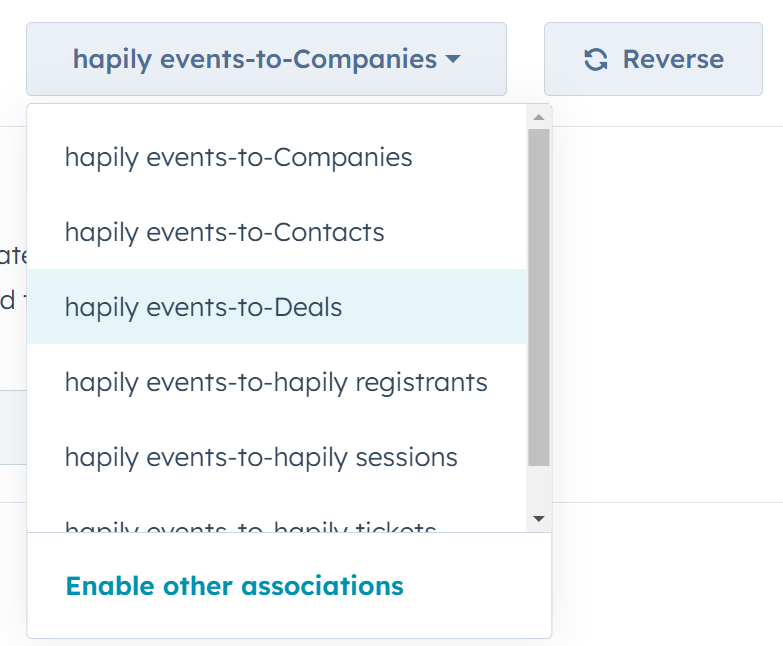
image8
vs

SimpleEvents - Logo - Black Text With Icon -

NO. You're limited to the Marketing Event object — nothing else.


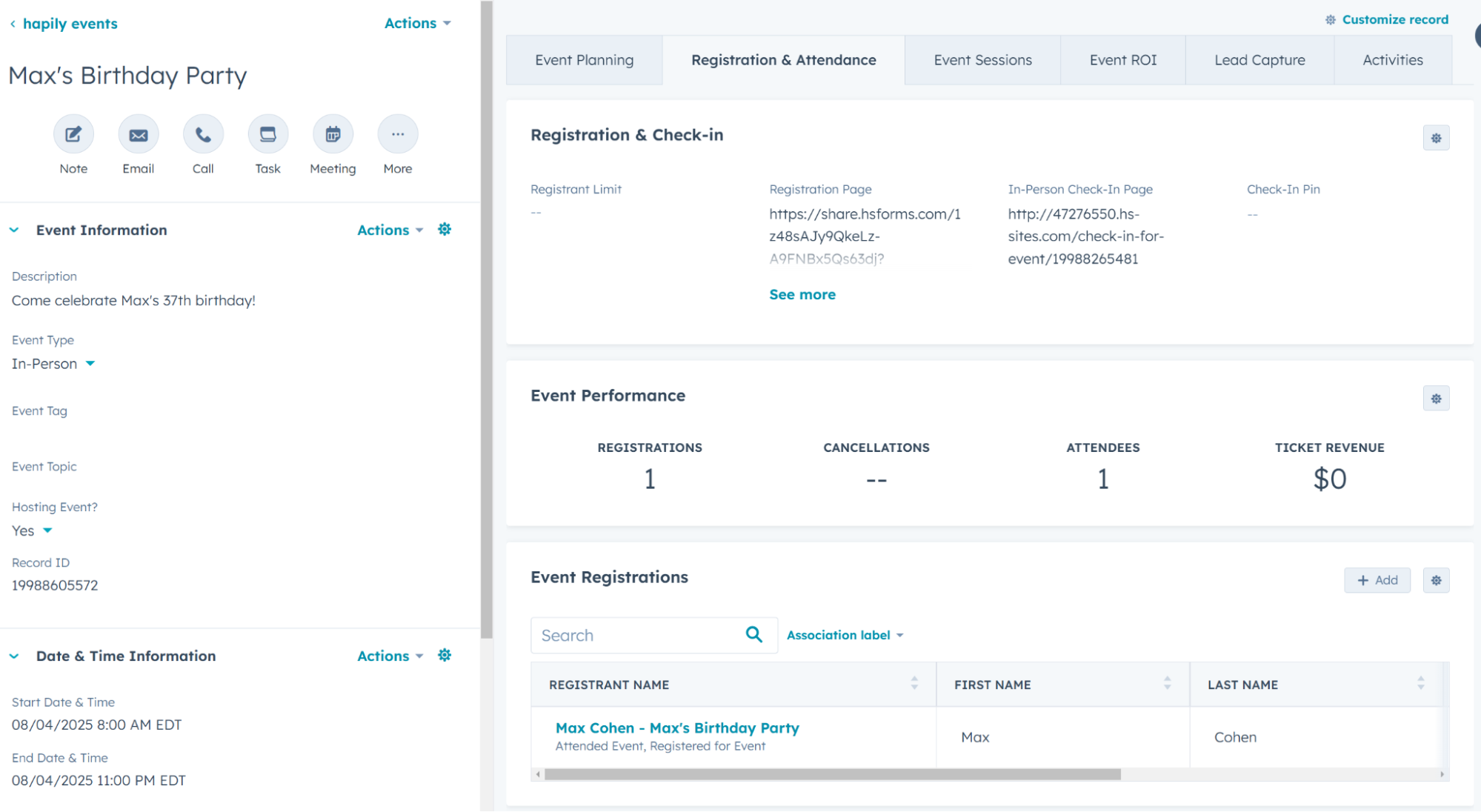
6. Can you customize the event record layout?


hapily logo

YES! Customize the layout just like any other standard or custom HubSpot object.
Event Stat
Group 10 (1)

SimpleEvents - Logo - Black Text With Icon -

NO. There is no custom event record, users are locked into the standard HubSpot Marketing Events object


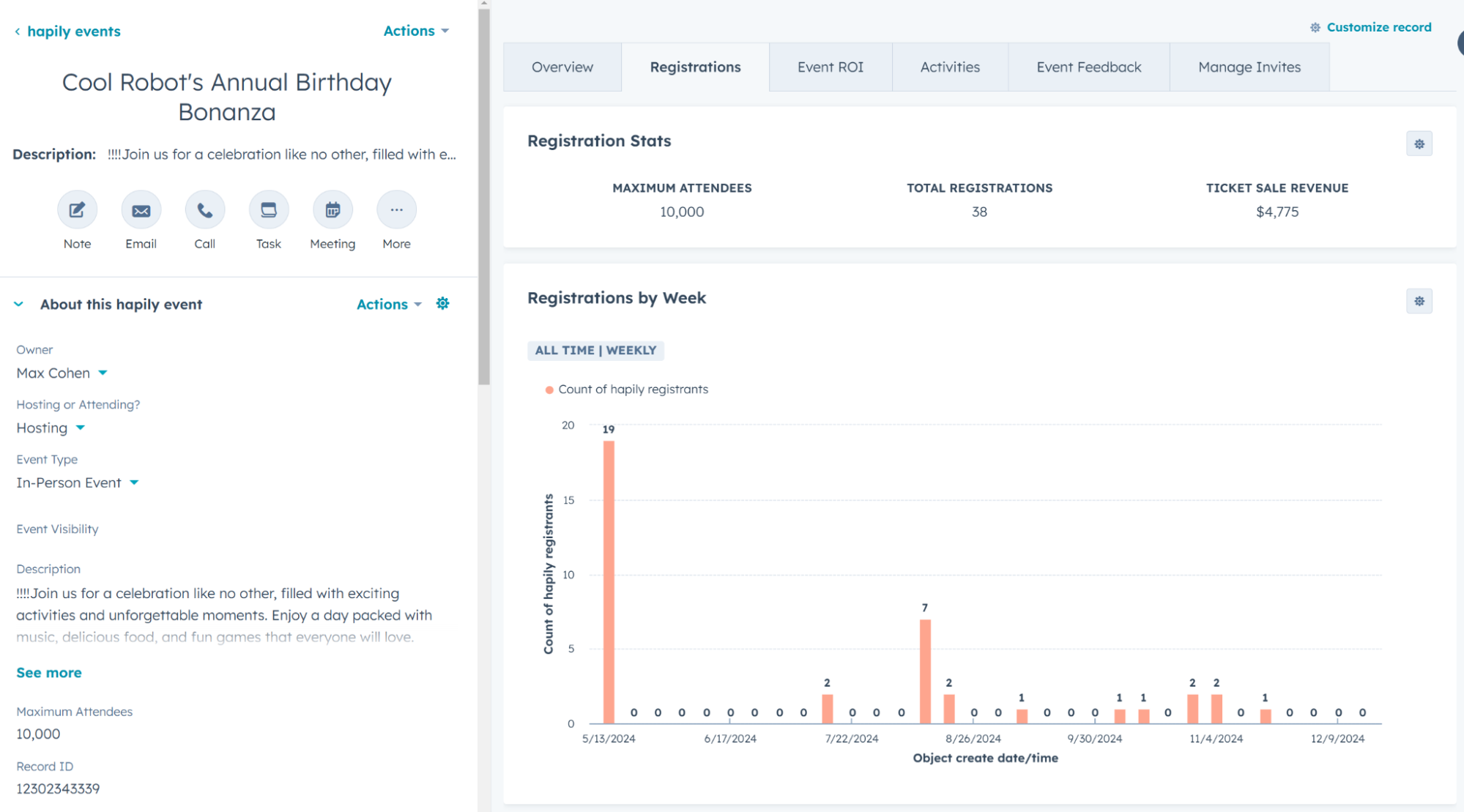
7. Can you build custom report UI cards?


hapily logo

YES! Easily visualize registrations over time and track key event metrics.
Event Reports
vs

SimpleEvents - Logo - Black Text With Icon -

NO. Limited to Marketing Event object view.


8. Are confirmations reliable at scale?


hapily logo

YES! Confirmation emails use registrant records, ensuring accurate personalization even when contacts register for multiple events.

unnamed (18)
vs

SimpleEvents - Logo - Black Text With Icon -

NO. Event data is stored on the contact record, so each new registration overwrites the last — fine for one-off events, but unreliable when attendees register for multiple events.

unnamed (19)


9. Can it limit capacity & registrations automatically?


hapily logo

YES! Capacity controls stop registrations when an event is full and support optional waitlists without extra setup.

unnamed (20)
unnamed (21)
vs

SimpleEvents - Logo - Black Text With Icon -

PARTIALLY. Capacity limits exist but require an additional embedded script instead of a built-in feature.

unnamed (22)
unnamed (23)


10. Can you register multiple guests at once?


hapily logo

YES! hapily's registration form module supports multiple registrations with customizable limits and creates or updates additional contacts AND registration records in HubSpot 

unnamed (24)
unnamed (25)
unnamed (26)
vs

SimpleEvents - Logo - Black Text With Icon -

YES! Supports guest registration by capturing any number of guests that will attend with the main registrant, and reflecting those guests in their check-in app.

unnamed (27)


11. Can you generate and use QR codes for entry?


hapily logo

YES! It supports permanent QR codes for event and session check-ins and displays customizable attendee details on scan.

unnamed (28)
unnamed (29)
vs

SimpleEvents - Logo - Black Text With Icon -

YES! It supports QR code check-in but only at the event level and without long-term registrant records.

unnamed (30)


12. Does it work for trade show or conference lead capture?


hapily logo

YES! It includes a dedicated mobile app that scans badges and business cards, enriches data with AI, and syncs everything to HubSpot instantly.
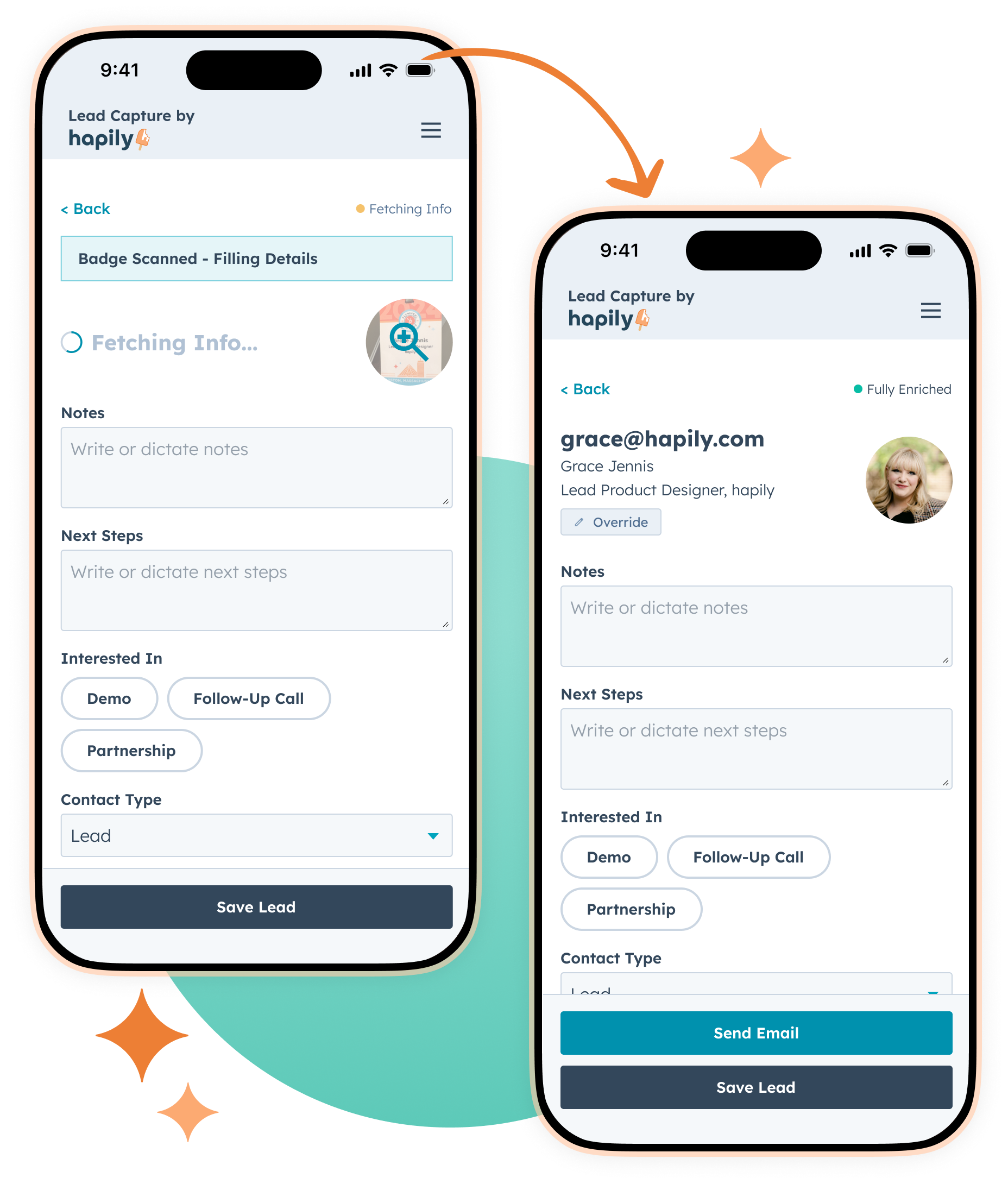
AI Enriched Data MLC with Circle 2x
vs

SimpleEvents - Logo - Black Text With Icon -

NO. It supports check-in only and does not offer mobile lead capture for tradeshows or conferences.


13. Is it possible to attribute deals automatically to events?


hapily logo

YES! Deal-based workflows automatically attribute revenue to the correct event, giving you reliable ROI reporting without relying on reps to flag where a deal came from.
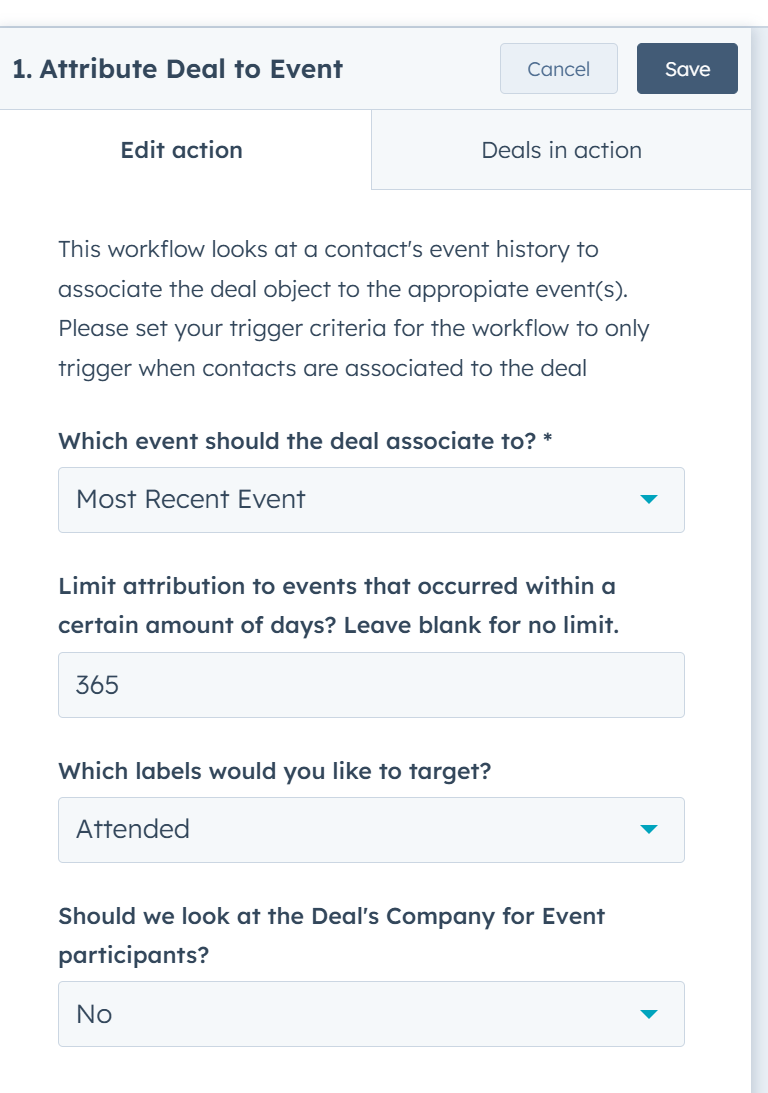
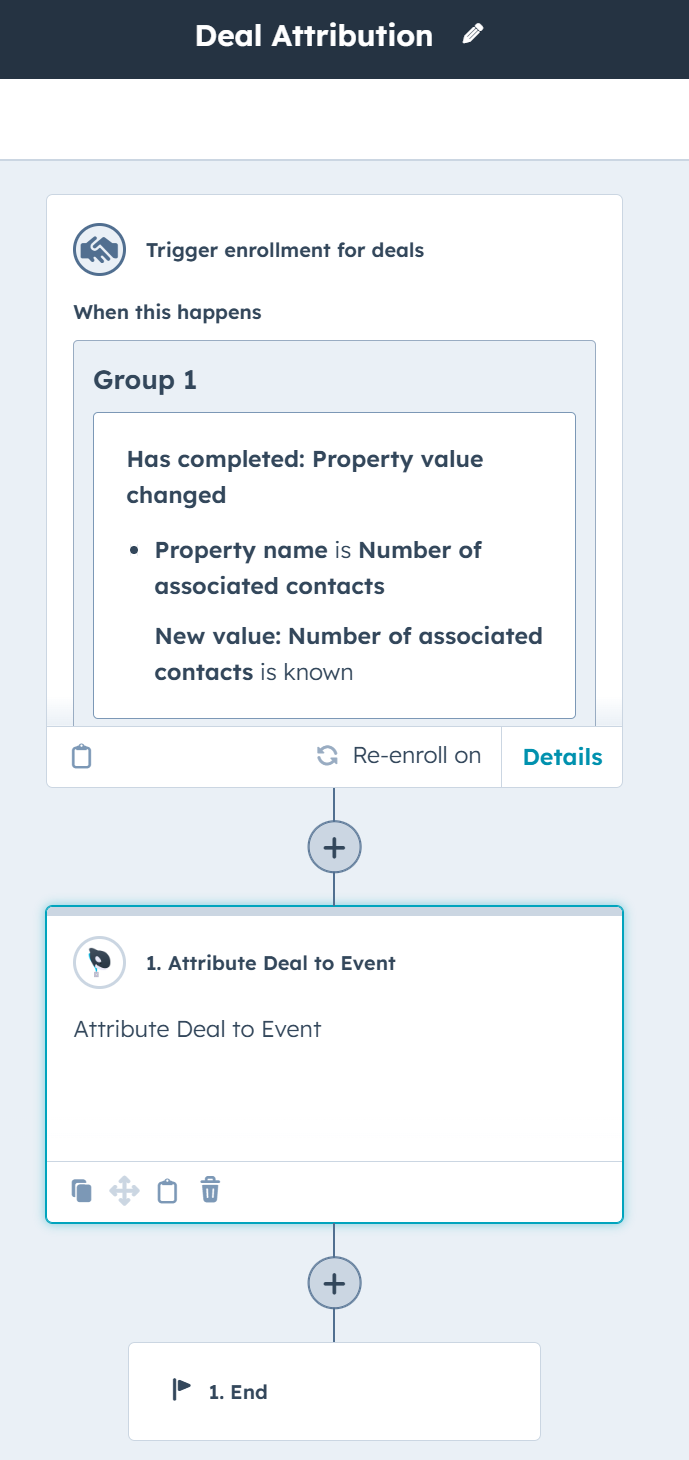
Deal Attribution to Event
Attribution Workflow
vs

SimpleEvents - Logo - Black Text With Icon -

NO. Revenue can’t be attributed back to events, so ROI reporting requires manual tracking.


14. Can you track event ROI?


hapily logo

YES! Thanks to our object-based data model, event-level ROI is fully automated and easy to surface in dashboards across all your events.
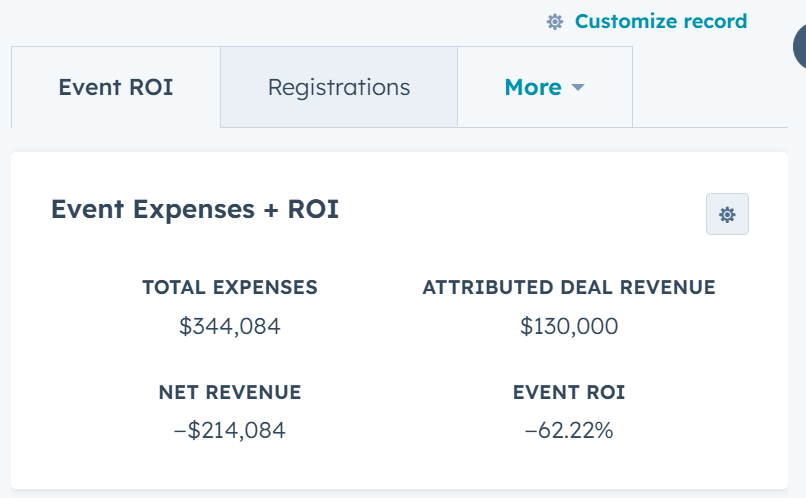
ROI stats
unnamed (31)
unnamed (32)
vs

SimpleEvents - Logo - Black Text With Icon -

NO. There are no customization options for tracking event ROI in HubSpot.


15. Can you generate event performance reports?


hapily logo

YES! Every event, registration, session, speaker, and sponsor is stored as its own object, making custom performance reporting easy, scalable, and reusable across all your events.

unnamed (33)
vs

SimpleEvents - Logo - Black Text With Icon -

NO. Most data lives on Marketing Events and contact properties, which makes performance reporting difficult and unreliable as event volume or repeat attendance increases.


16. How powerful is the workflow automation?


hapily logo

You can automate confirmations, reminders, post-event outreach, speaker and sponsor workflows, and more using custom objects.

unnamed (34)
vs

SimpleEvents - Logo - Black Text With Icon -

Automation is limited to contact-based workflows, which restricts event-level operations.

unnamed (35)

hapily blog

The latest from the hapily team:

[ON-DEMAND WEBINAR] Events That Build Trust: A CRM-Powered Approach for Professional Services Teams

[ON-DEMAND WEBINAR] Events That Build Trust: A CRM-Powered Approach for Professional Services Teams

Learn how CRM-powered events build trust in professional services by connecting event data with client context, ensuring seamless execution...

Release Notes | January 2026

Release Notes | January 2026

A quick look at new feature releases, improvements, and bug fixes.

How Enriched Lead Data Strengthens Your Post-Event Strategy

How Enriched Lead Data Strengthens Your Post-Event Strategy

Capturing leads is easy, but enriching them is where the magic happens.

 

SCHEDULE A DEMO TODAY!

Ready to
event hapily?

Women On Site with Tablet - Light Background